


Newsmax
3.212.54K Reviews
App Specs
- Version
- Varies with Device
- Updated On
- License
- Free
- Downloads
- 1,000,000+
- Developer
- Newsmax Media
- Categories
- News & Magazines
- Platform
- Android, iOS
Screenshots

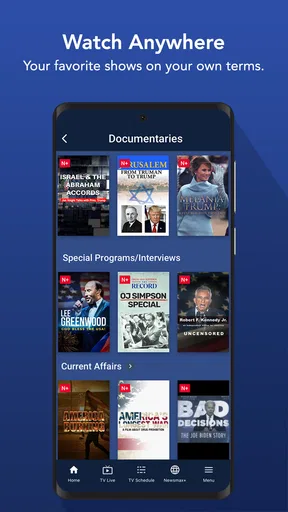

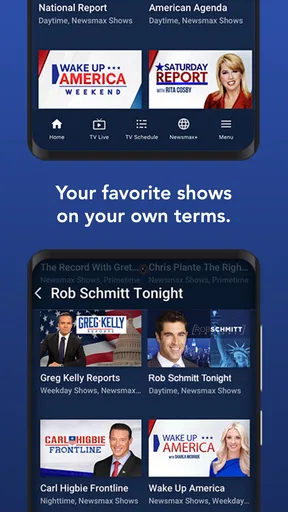
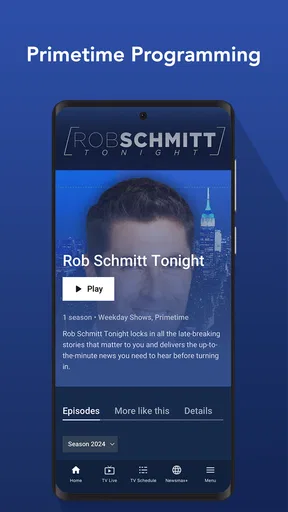



 Analysis by AppCompare
I use a news app best when it has a clear place in my day, rather than becoming another stream I check without purpose. With Newsmax, that means choosing a few useful moments to scan headlines, opening stories that matter to me, and treating its coverage as one perspective rather than my entire news diet. The app is free, from Newsmax Media, and sits in the news and magazines category. Its focus can make it a practical fit for readers who want political coverage with a conservative viewpoint alongside stories about world events, finance, and health.
A repeatable way to check the news
My most useful routine is simple: open the app when I have a few minutes, scan the main headlines, and pick one or two articles instead of trying to read everything. That small habit helps keep the experience purposeful. If I have more time, I can move from a headline into a longer story or use the live TV option when I would rather listen or watch than read on a small screen.
For example, on a busy morning I might check for major political developments before leaving home, then leave the app closed while I work. An alert can bring an important story to my attention, but I do not need to keep refreshing the feed to feel informed. Later, I can open the relevant coverage and decide whether it deserves more of my time. This is a better fit for me than letting every update interrupt the day.
The app is most useful when I know what I want from it: a quick look at Newsmax’s take on current events, a topic such as health or finance, or a live news segment. That focus is also a trade-off. It can be a regular stop in a broader news routine, but I would not treat a single outlet as a complete substitute for comparing reporting and perspectives elsewhere.
Settings and habits that make it easier
I would start by reviewing the available feed and notification choices rather than accepting every prompt automatically. The original experience includes feed customization and optional alerts for breaking news and top stories. Choosing the subjects I actually follow can make a short visit more relevant, while limiting alerts can prevent news from taking over the lock screen. A useful test is to leave notifications on only if they help me act or understand something sooner than my next planned check.
There is a practical distinction between an alert and a reading plan: an alert tells me something may be worth opening, but it does not decide whether the story is important to my own interests. I find it helpful to treat notifications as pointers, then read the article when I have enough attention to consider the details. If an alert arrives at a bad time, I can save the decision for later rather than turning every interruption into an immediate session.
Feed customization is most effective when I use it to reduce noise, not to build a bubble. I can prioritize areas I care about and still make a deliberate habit of checking how other outlets frame the same major story. That matters especially for politics, where the app’s conservative viewpoint is part of its appeal for some readers and a reason others may want a second source. Personalization makes the app more convenient; it does not make its coverage neutral by itself.
Worth Reading Before You Choose

EA SPORTS FC Mobile 26 Is a Bigger Football Game, but It Takes Time

Flipboard Shows What News Apps Must Do Beyond the Feed

Switching to Android Auto Means Rethinking Your Driving Routine

Google Calendar Makes a Crowded Week Easier to Manage

Ludo King Makes the Most of the Minutes Between Plans

Baby Panda World Brings Quick Play to Modern Phones, but Its Game Library Feels Busy
Reading, watching, and comparing coverage
The choice between articles and live TV changes how I use the app. Reading works better when I want to move at my own pace, revisit a point, or fit a story into a quiet break. Live coverage suits moments when I want a continuous presentation of news without selecting each article. It is a useful alternative within the app, although I would choose written reporting when I need to compare details carefully or scan for a specific fact.
Compared with a broad aggregator, Newsmax offers a more defined editorial identity rather than making its main value the collection of many publishers in one place. That can save time if I am specifically looking for its perspective. A general news app or a mix of established outlets is a better choice if I want contrasting editorial approaches surfaced side by side. I see these as different tools: one offers a focused viewpoint, while the other can help me compare how a story is covered.
For a topic with practical consequences, such as a financial decision or a health concern, I would use the app to follow coverage and identify questions, not as my sole basis for action. News reporting can provide context, but it is not a substitute for advice from a qualified professional who understands my circumstances. That boundary is easy to overlook when an article is written confidently, so I keep it in mind before turning a news story into a personal decision.
Getting Started with Newsmax
The first thing I noticed when installing the Newsmax app was its straightforward setup. It's available for both Android and iOS, and downloading it was a breeze. You won’t need to jump through hoops to get started—just a quick download, and you’re in!
Once you open the app, you’re greeted with a clean and intuitive interface. The layout is pretty user-friendly, making it easy to navigate through different sections. Whether you’re a tech whiz or not, you’ll find it simple to browse through the headlines and categories.
Diving Into the Content
Now, let's talk about what you’re here for—the content. The app features a wide range of news stories covering politics, health, finance, and more. If you're particularly interested in conservative viewpoints, it delivers content that aligns with that perspective. I found the articles to be detailed and informative, often offering insights that you might not get from mainstream media outlets.
One cool feature I enjoyed is the live TV option. Yup, you can actually watch Newsmax TV live from the app, which is perfect for when you want to catch up on the latest happenings straight from your device.
User Experience and Features
In terms of user experience, the app runs smoothly. I didn’t encounter any glitches or crashes, which is a huge plus in my book. The app allows you to customize your feed, so you can focus on the categories that matter most to you. This personalization feature ensures that you’re not bombarded with stories you’re not interested in.
Notifications are another standout feature. You can opt-in to receive alerts for breaking news and top stories. I found this super handy, especially on busy days when I couldn’t keep checking the app for updates.
Limits, audience, and the overall call
There is a real difference between a smooth interface and a perfect fit. Newsmax is aimed at readers who value its particular editorial perspective; someone seeking a deliberately broad range of political viewpoints may find that the app’s focus leaves them wanting. I would pair it with other reporting when an issue is contentious or consequential, rather than expecting one app to supply every angle.
The app has an average rating of about 3.2 from around 33,000 ratings, and it has been installed more than a million times. I take that as a reminder that people’s experiences can vary, not as a verdict on whether the coverage will suit me. It is free and rated for Everyone, so trying it does not require a purchase; the more important question is whether its editorial voice and format work for the way I follow news.
Newsmax was released in March 2014, and I would judge it by the current experience rather than by its age. Its established identity is easy to understand: a focused news destination with a live viewing option, topic coverage, and alerts. The limits are just as important to recognize. A live stream can be less convenient than text when I need to find one detail quickly, and a notification-heavy routine can become distracting if I do not choose alerts carefully.
People often ask whether it is useful without watching live TV. In my view, yes: the articles and customizable feed can support a reading-first routine, while the live option is there for viewers who prefer it. I would also ask whether it works for someone who wants every political perspective in one place. That is not where I would put it; a general news aggregator or a deliberate mix of sources is more suitable for that purpose.
Who should make it part of a routine?
I would recommend it to someone who wants a straightforward way to follow Newsmax’s coverage, especially if politics is a regular interest and they also want to browse finance, health, and world news. It may suit a reader who prefers opening a familiar outlet directly instead of sorting through a large collection of publishers. The strongest use case is not “read everything”; it is checking selected coverage and then moving on with the day.
I would suggest skipping it if a strongly defined editorial viewpoint is not what you want, or if your priority is to compare opposing interpretations without switching between apps. It may also be a poor match if you dislike breaking-news alerts or prefer a news experience organized around sources you choose yourself. Those readers are better served by an aggregator or by visiting several outlets intentionally.
A useful advanced habit is to separate discovery from verification. I can use a headline or live segment to notice a developing issue, then compare the central claims with reporting from another source before forming a firm opinion. This is not extra work for every routine story; it is a sensible check for major political claims, rapidly changing events, and anything that could affect a personal decision. The app’s focused coverage is valuable for seeing one perspective clearly, but that same focus makes comparison worthwhile.
What I would keep in mind after the first week
After using it for a while, I would review whether the app is earning its place in my routine. Are the categories I follow still relevant? Do alerts tell me something I want to know promptly, or do they simply pull me out of other tasks? Do I actually use live TV, or are articles the better fit? These questions turn personalization into a practical habit instead of a one-time setup decision.
I would also avoid assuming that a clean layout means every story deserves equal attention. A quick scan can be enough for a routine update, while a complex issue deserves a slower read and comparison. If I am short on time, I can check headlines and leave deeper reading for later; if I have time to watch live coverage, I can use that format without mistaking it for a replacement for careful reading.
So, what’s my take on the app? Overall, it’s a solid choice if you’re looking for a news app with a conservative angle. The easy navigation, live TV access, and personalized news feed make it a convenient tool for staying informed.
While it might not be everyone’s cup of tea, especially if you're looking for a more varied political perspective, it serves its purpose well for its target audience. Plus, the fact that it’s free is always a win!
So, if you're curious, why not give it a try? You might just find it to be the perfect companion for your daily dose of news.
Pros
- User-friendly interface for easy navigation.
- Wide range of news categories available.
- Live streaming option for real-time updates.
- Customizable notifications for breaking news.
- Offline reading mode for convenience.
Cons
- Contains ads that can be intrusive.
- Limited free content; subscription needed.
- Occasional glitches in video playback.
- Some content may be biased.
- Requires stable internet for smooth use.
FAQs for Newsmax
What is Newsmax, and how does it differ from other news apps?
Newsmax is a news app that delivers real-time news updates, covering a wide range of categories including politics, world events, and finance. Unlike many other news apps, Newsmax offers a conservative perspective on current events, which may appeal to users seeking an alternative viewpoint. It also features live-streaming news channels and exclusive interviews.
Is the Newsmax app free to use, or are there any subscription costs?
The Newsmax app is free to download and use, providing users with access to a variety of news articles, videos, and live-streaming content at no additional cost. However, it may contain ads, and some exclusive content might require a subscription or registration to access fully.
What devices and operating systems are compatible with the Newsmax app?
The Newsmax app is available for both iOS and Android devices. It supports a wide range of smartphones and tablets running recent versions of these operating systems. Users should ensure their device is updated to the latest OS version for optimal performance and security.
How reliable is the information provided by Newsmax?
Newsmax aims to deliver timely and accurate news from a conservative perspective. Like any news source, users should cross-reference news reports with other reliable outlets. The app provides a mix of news articles, videos, and opinion pieces, so discerning the difference between news and opinion content is important for users.
What features does Newsmax offer for personalization and user engagement?
Newsmax provides several features for personalization, including the ability to customize news feeds based on user interests and preferences. Users can bookmark articles for later reading, set up notifications for breaking news, and engage with content through comments and social media sharing options. This makes the app interactive and tailored to individual user needs.


